
Bulk import (CSV)
Move existing collections in from a spreadsheet.
Bulk import (CSV)
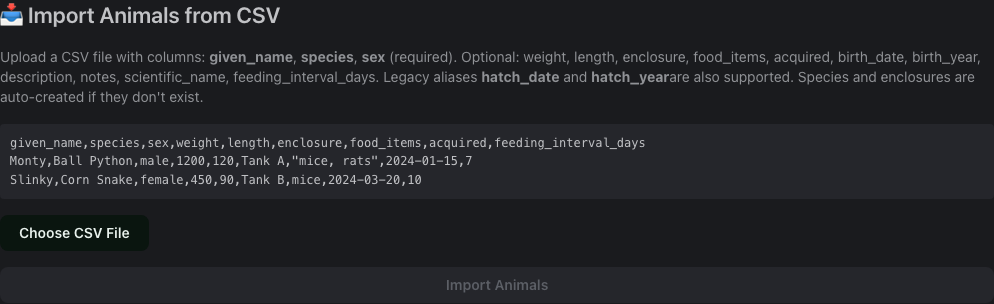
Owners only. Go to Animals and click Import from CSV above the table.
What it imports
Animals only. Each row becomes one animal. Referenced species and enclosures don't need to exist beforehand — if a name doesn't match an existing record, ScaleVault creates it automatically and reports how many it added.
Feedings, sheds, and weight logs aren't imported from this screen; each of those tabs on an individual animal's detail page has its own Import CSV button with column mapping, so you can bring in per-record history for an animal you've already added.
Required columns
given_name, species, sex. Everything else is optional: weight,
length, enclosure, food_items, acquired, birth_date,
birth_year, description, notes, scientific_name,
feeding_interval_days. The legacy aliases hatch_date and
hatch_year are also accepted for birth_date/birth_year.
Workflow
- Paste or choose a
.csvfile. There's no downloadable template — copy the example shown on the page (or the header row above) to start your own. - The page previews the first few rows before you commit.
- Click Import. Rows are processed together; failed rows are reported individually with the reason (missing required field, etc.) without discarding the rows that succeeded.
Export
Each list view (Animals, Species, Enclosures, Clutches, Feedings) has its own Export CSV button that downloads a full snapshot of that table — useful for backups or moving to another system.