
Feedings
Logging meals, the quick-feed shortcut, and per-animal defaults.
Feedings
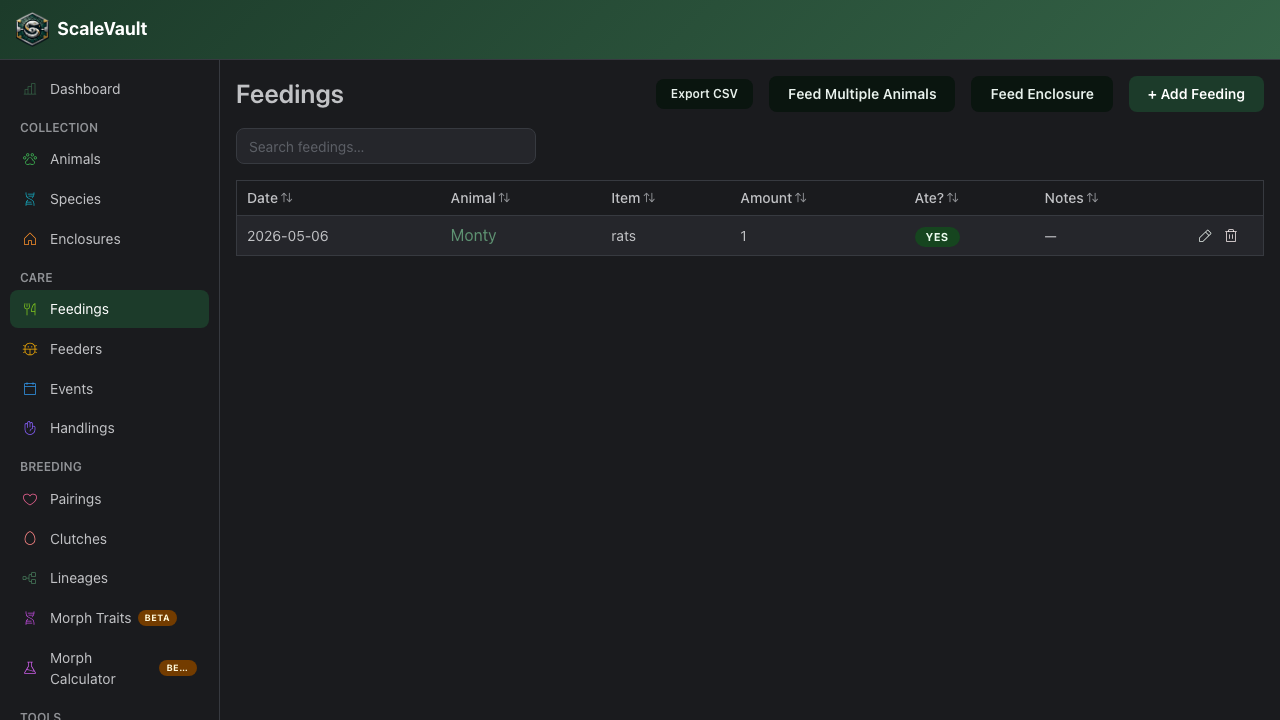
Feeding is the most-logged action in the app, so the workflow is designed to take seconds.
Three ways to log a feeding
1. From the animal page
Go to an animal → 🍽️ Feed. The form pre-selects today's date, the species' first food, and the animal's last amount.
2. From the QR code (one-tap)
Scan the printed QR code with your phone. ScaleVault opens directly to the prefilled feeding form for that animal. One tap on Confirm and you're done. See QR codes & quick actions.
3. From the enclosure (multi-animal feed)
Scan the enclosure QR or open the enclosure page → 🍽️ Feed enclosure. This logs a feeding for every animal in the enclosure in one go — useful for racks where every animal eats the same thing on the same night.
Per-animal feed defaults
Each animal can override its feed defaults under the animal form:
- Quick-feed food — overrides the species default for the QR one-tap path.
- Quick-feed amount — overrides the default of 1.
- Disable quick feed — when checked, the QR code still opens the full feed form (no one-tap "Confirm"). Useful for animals on experimental diets where you don't want anyone autopiloting a meal.
What you can log
- Food item — text, or pick from the species list and your feeder colonies and inventory.
- Amount — usually count of items (1 rat, 3 crickets) or grams.
- Ate? — checkbox. Refusals matter, log them.
- Notes — anything notable.
- Date — defaults to today; back-date as needed.
- Feeder Colony — optional; links the feeding to a colony or inventory entry. Filled in automatically when the food item matches one by name. (Adult plan and above)
- Deduct from inventory — shown once a colony is selected; takes the amount fed off that entry's stock count. See Feeder colonies & inventory.
Enclosure feedings have the same Feeder Colony and Deduct from inventory fields. Stock is deducted once for each animal in the enclosure, so feeding 4 animals 1 mouse each takes 4 off the count.
Charts
Feedings show up on the animal timeline and in monthly bar charts on the dashboard.